Ajet swarm docker
This guide explains how to launch the AgentJet Swarm Server inside a Docker container. The Swarm Server is the GPU-side component responsible for gradient computation, and weight updates. It exposes an OpenAI-compatible API that Swarm Clients connect to for training.
Not familiar with Swarm? Read the Swarm Introduction first.
Prerequisites
| Requirement | Detail |
|---|---|
| Docker | With GPU support (nvidia-container-toolkit) |
| AgentJet Docker image | ghcr.io/modelscope/agentjet:main (built from the AgentJet repository) |
| LLM model weights | Downloaded locally (e.g., Qwen2.5-7B-Instruct) |
Command Template
Run the command below:
docker run --rm -it \
  -v /path/to/host/Qwen/Qwen2.5-7B-Instruct:/Qwen/Qwen2.5-7B-Instruct \
  -v ./swarmlog:/workspace/log \
  -v ./swarmexp:/workspace/saved_experiments \
  -p 10086:10086 \
  -e SWANLAB_API_KEY=$SWANLAB_API_KEY \
  --gpus=all \
  --shm-size=32GB \
  ghcr.io/modelscope/agentjet:main \
  bash -c "(ajet-swarm overwatch) & (NO_COLOR=1 LOGURU_COLORIZE=NO ajet-swarm start &>/workspace/log/swarm_server.log)"
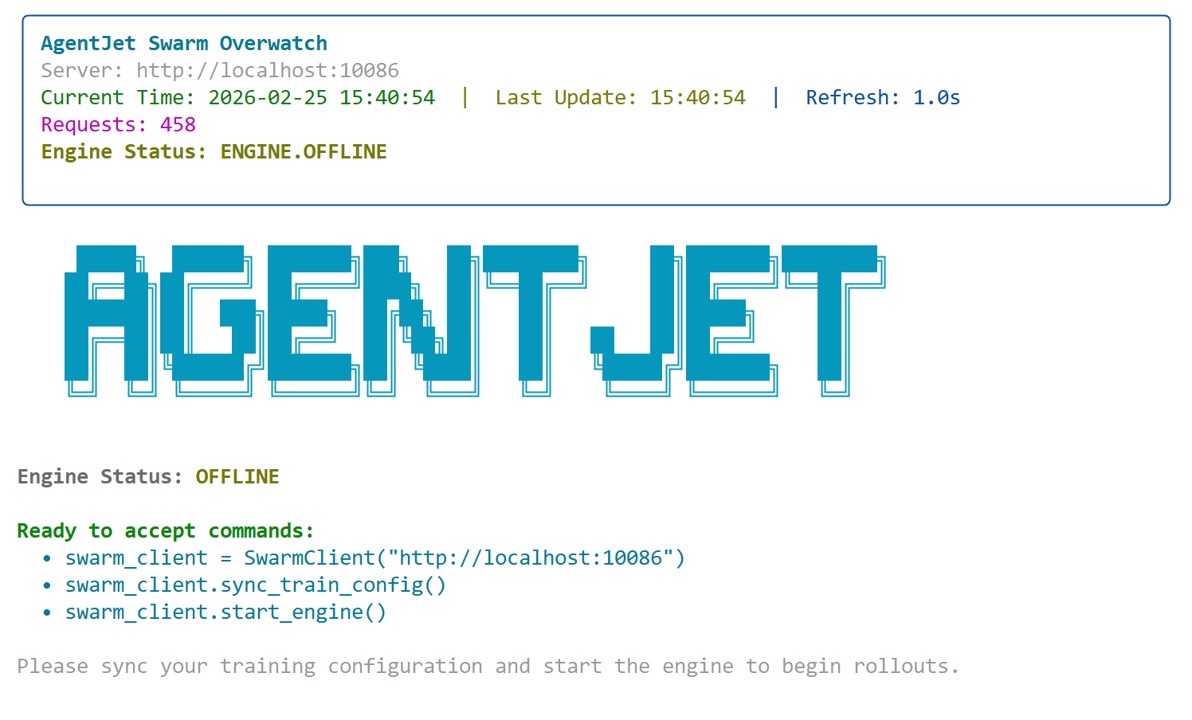
And when completed, you will see a interface like this, which means the deployment is successful:
| Flag / Argument | What it does |
|---|---|
--rm |
Automatically remove the container when it exits. Keeps things clean. |
-it |
Allocates an interactive TTY. Required for the ajet-swarm overwatch TUI monitor to render correctly inside the container. |
-v /path/to/host/Qwen/Qwen2.5-7B-Instruct:/Qwen/Qwen2.5-7B-Instruct |
Model mount — mounts your local model weights directory into the container. The path inside the container must match the model field you configure in your training job. |
-v ./swarmlog:/workspace/log |
Log mount — mounts a local ./swarmlog directory to persist server logs outside the container. The VERL training log is written here. |
-p 10086:10086 |
Port mapping — exposes port 10086 so that Swarm Clients on other machines can reach the server via http://<server-ip>:10086. |
ghcr.io/modelscope/agentjet:main |
The AgentJet Docker image. |
bash -c "..." |
Runs two processes concurrently inside the container (see below). |
The Two Processes Inside bash -c
The command launches two background processes with &:
(ajet-swarm overwatch)
&
(NO_COLOR=1 LOGURU_COLORIZE=NO ajet-swarm start &>/workspace/log/swarm_server.log)
| Process | What it does |
|---|---|
ajet-swarm overwatch |
Starts the real-time TUI monitor in the foreground. Displays the current server state (OFFLINE / BOOTING / ROLLING / WEIGHT_SYNCING), active episodes, and rollout statistics. |
ajet-swarm start |
Starts the Swarm Server itself — initializes VERL training loop, vLLM inference engine, and the FastAPI HTTP server on port 10086. |
NO_COLOR=1 LOGURU_COLORIZE=NO |
Disables ANSI color codes in the server log so the log file swarm_server.log is readable as plain text. |
&>/workspace/log/swarm_server.log |
Redirects both stdout and stderr of the server process to the log file (which is persisted to your host machine via the volume mount). |
Concrete Example
The following example mounts a model downloaded at host directory /root/agentjet/modelscope_cache/Qwen/Qwen2___5-7B-Instruct,
and we would like to mount it at container directory: /mnt/data_cpfs/model_cache/modelscope/hub/Qwen/Qwen/Qwen2.5-7B-Instruct
docker run --rm -it \
  -v /root/agentjet/modelscope_cache/Qwen/Qwen2___5-7B-Instruct:/mnt/data_cpfs/model_cache/modelscope/hub/Qwen/Qwen/Qwen2.5-7B-Instruct \
  -v ./swarmlog:/workspace/log \
  -v ./swarmexp:/workspace/saved_experiments \
  -p 10086:10086 \
  -e SWANLAB_API_KEY=$SWANLAB_API_KEY \
  --gpus=all \
  --shm-size=32GB \
  ghcr.io/modelscope/agentjet:main \
  bash -c "(ajet-swarm overwatch) & (NO_COLOR=1 LOGURU_COLORIZE=NO ajet-swarm start &>/workspace/log/swarm_server.log)"
Make sure the container-side path matches whatever model path you specify in your AgentJetJob.
What Happens After Launch
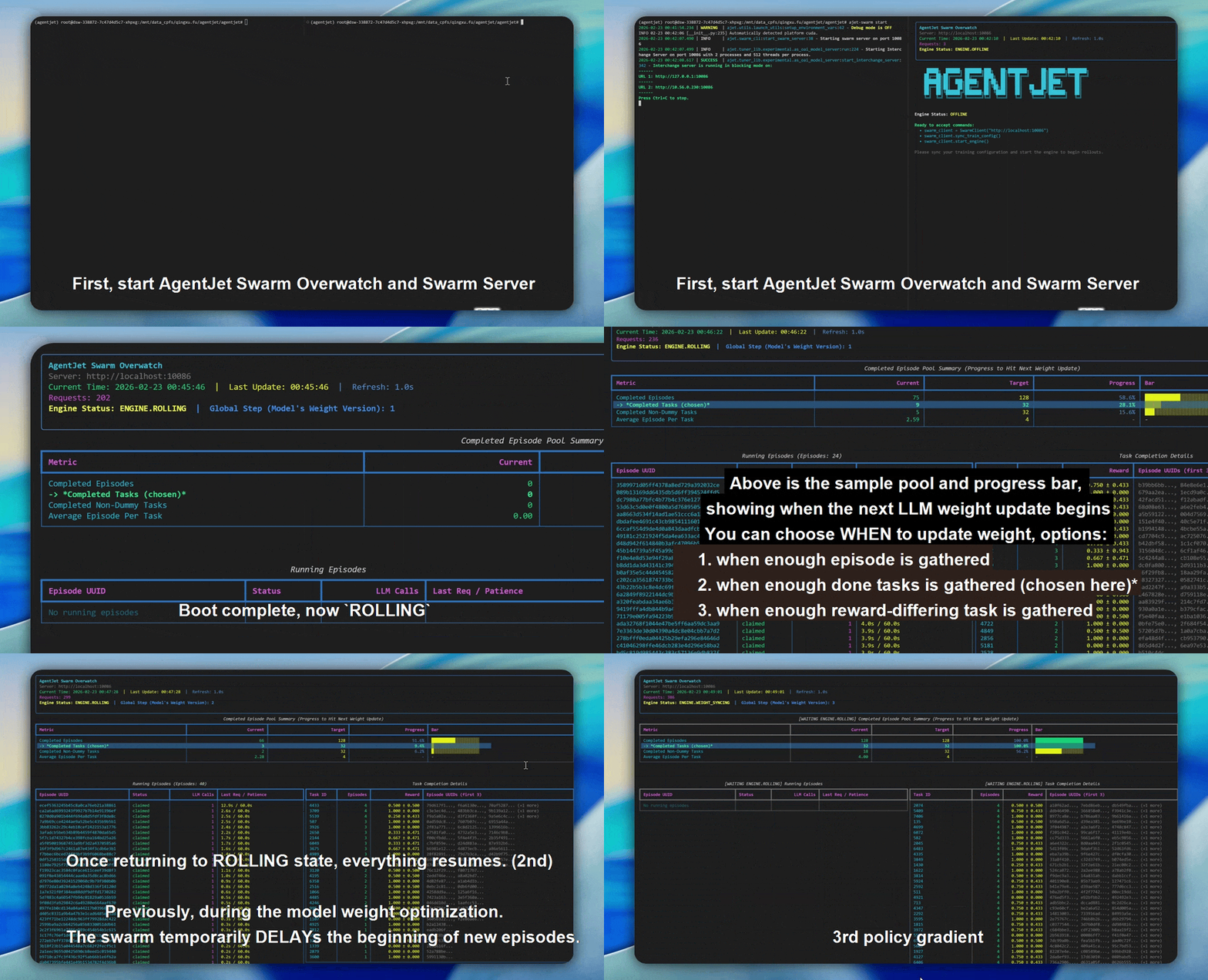
Once the container starts, you will see the ajet-swarm overwatch TUI in your terminal. The server begins in OFFLINE state and transitions through:
The server only moves to BOOTING after a Swarm Client sends it a training configuration and calls start_engine(). Until then it waits safely in OFFLINE.
Meanwhile, all VERL and training logs stream into ./swarmlog/swarm_server.log on your host machine.
Connecting a Swarm Client
From any machine (no GPU required) that can reach the server on port 10086, run your Swarm Client:
from ajet.tuner_lib.experimental.swarm_client import SwarmClient
from ajet.copilot.job import AgentJetJob

swarm_worker = SwarmClient("http://<server-ip>:10086")
swarm_worker.auto_sync_train_config_and_start_engine(
    AgentJetJob(
        algorithm="grpo",
        n_gpu=8,
        model="/mnt/data_cpfs/model_cache/modelscope/hub/Qwen/Qwen/Qwen2.5-7B-Instruct",
        batch_size=32,
        num_repeat=4,
    )
)
The
modelpath here must be the container-side path (right-hand side of the-vmount), not the host path.
See Swarm Best Practices for full client examples.
Troubleshooting
| Symptom | Likely Cause | Fix |
|---|---|---|
| Server stays OFFLINE forever | No client has called start_engine() |
Run your Swarm Client script to send the training config |
Model not found error in log |
Container-side model path is wrong | Verify the right-hand side of your -v flag matches the model field in AgentJetJob |
Client cannot connect to port 10086 |
Firewall or wrong IP | Check server firewall rules; use ajet-swarm overwatch --swarm-url=http://<ip>:10086 to test connectivity |
| Log file is empty | ./swarmlog directory doesn't exist on host |
Create it first: mkdir -p ./swarmlog |