Swarm deepdive
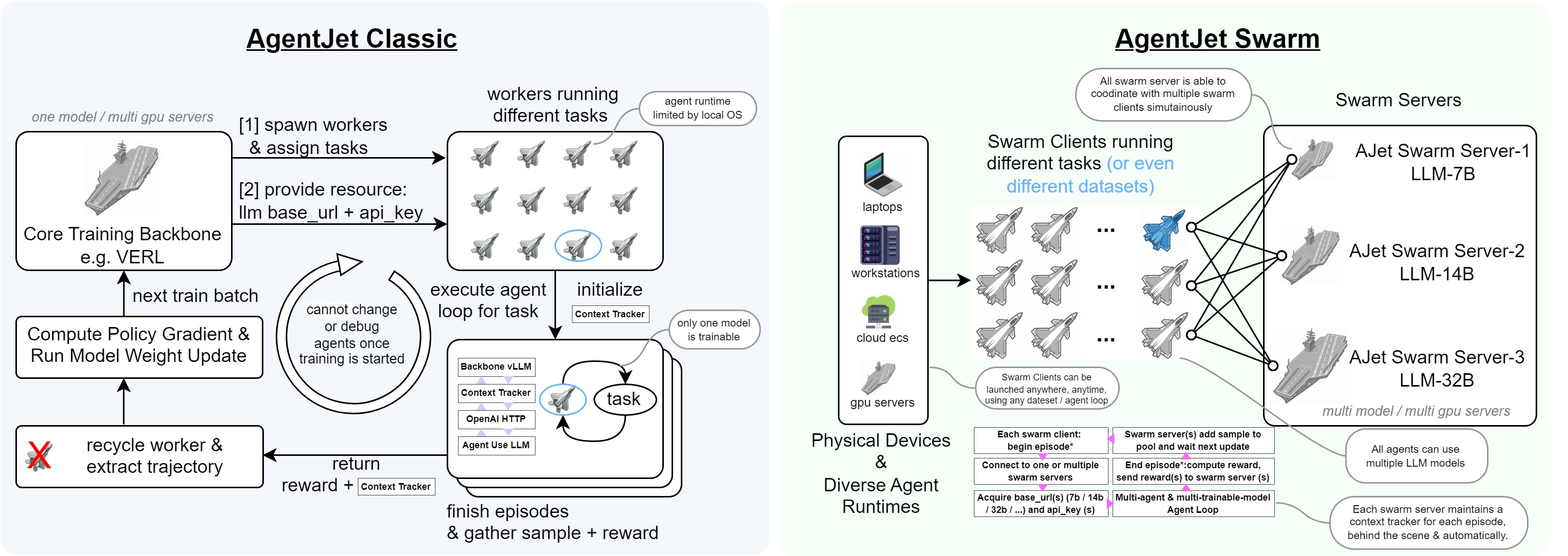
Swarm Training in AgentJet opens many possibilities: deploying distributed & self-healing rollout workers, non-shared-parameter multi-agent training, multi-runtime & multi-task cocktail training. And just like Tinker, you can use AgentJet Swarm to train models even on GPU-less laptop(s)**.
Next, this document will reveal the technique details of the AgentJet Swarm.
Architecture
AgentJet Swarm has two parts:
-
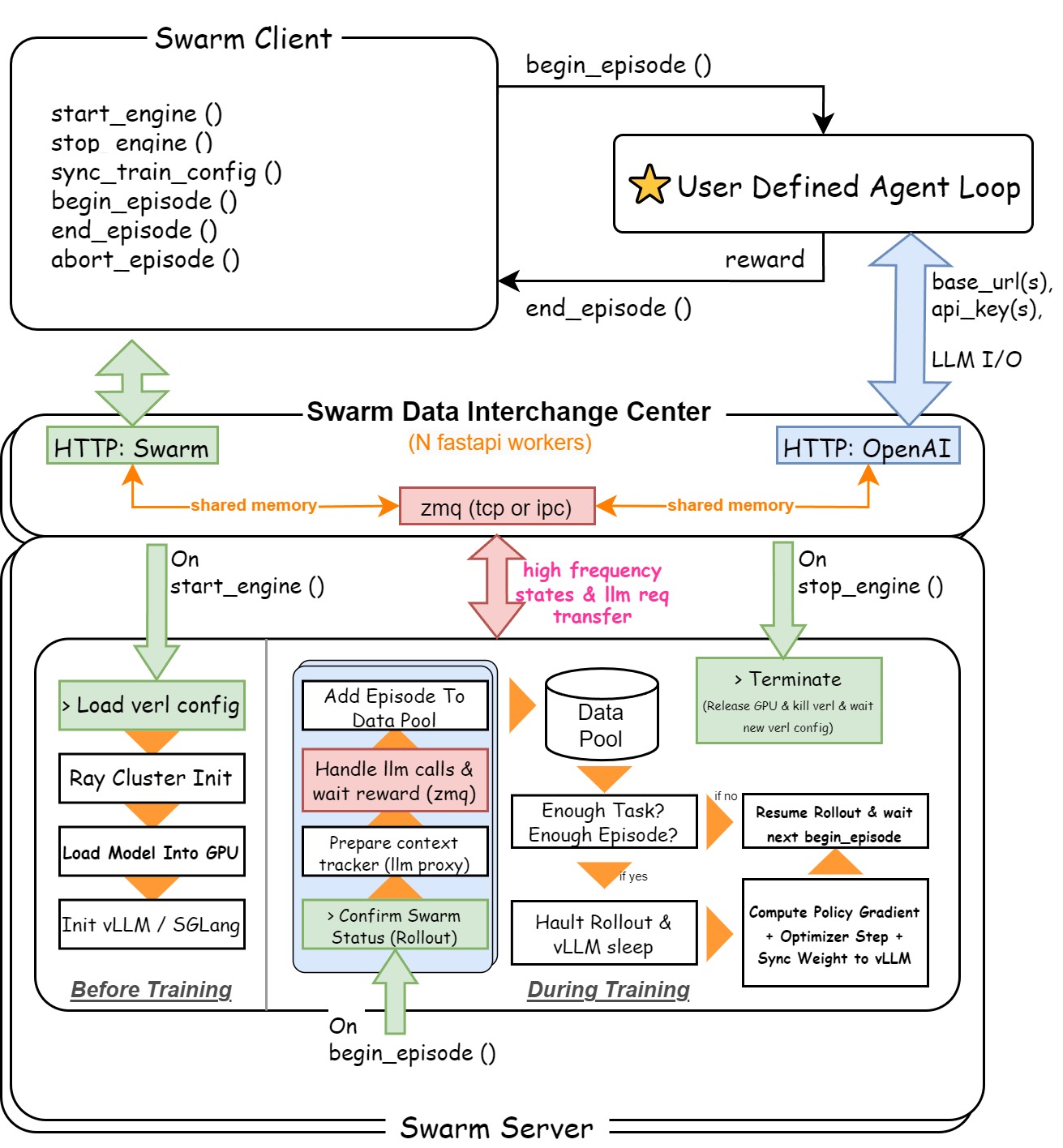
(1) Swarm Server: To make it easy to understand, Swarm Server is basically VERL backbone plus a data interchange center, which is reponsible to build a unified HTTP server to provide an OpenAI-Compatible Server API (with context manager that automatically converts LLM Requests to training samples) + Swarm Command API (handle command from swarm client such as
sync_train_configandstart_engine). -
(2) Swarm Client: A light-weighted client that can be deployed in anywhere and any runtime. Swarm clients work in a decentralized way even when they are participanting a same training party. In general, the job of swarm clients is easy, they call
begin_episodeto get llmbase_urlandapi_key, and callend_episodeto send reward back to server. There is several point that worth noticing:- There is no such role as queen in AgentJet swarm, therefore any swarm client can order swarm server to load yaml configuration, start training, or terminate process.
- Avoid casually calling
stop_enginein swarm clients when you are training a model, beacuse the swarm server will do anything you command it to do. - When you call
sync_train_configto send training configurations from multiple clients, only the latest configuration takes effect. - When you successfully
begin_episode(discard_episode_timeout=...), you immediately obtained the computational resource (base_urlandapi_key). Remember this resource does not last forever: if you do not usebase_urland goes inactive fordiscard_episode_timeoutseconds, the swarm server will consider episode crashed and take away the resource automatically.
This is a design graph for swarm mode in AgentJet:
In the following section, we will deep dive into the AgentJet Swarm.
Swarm Server
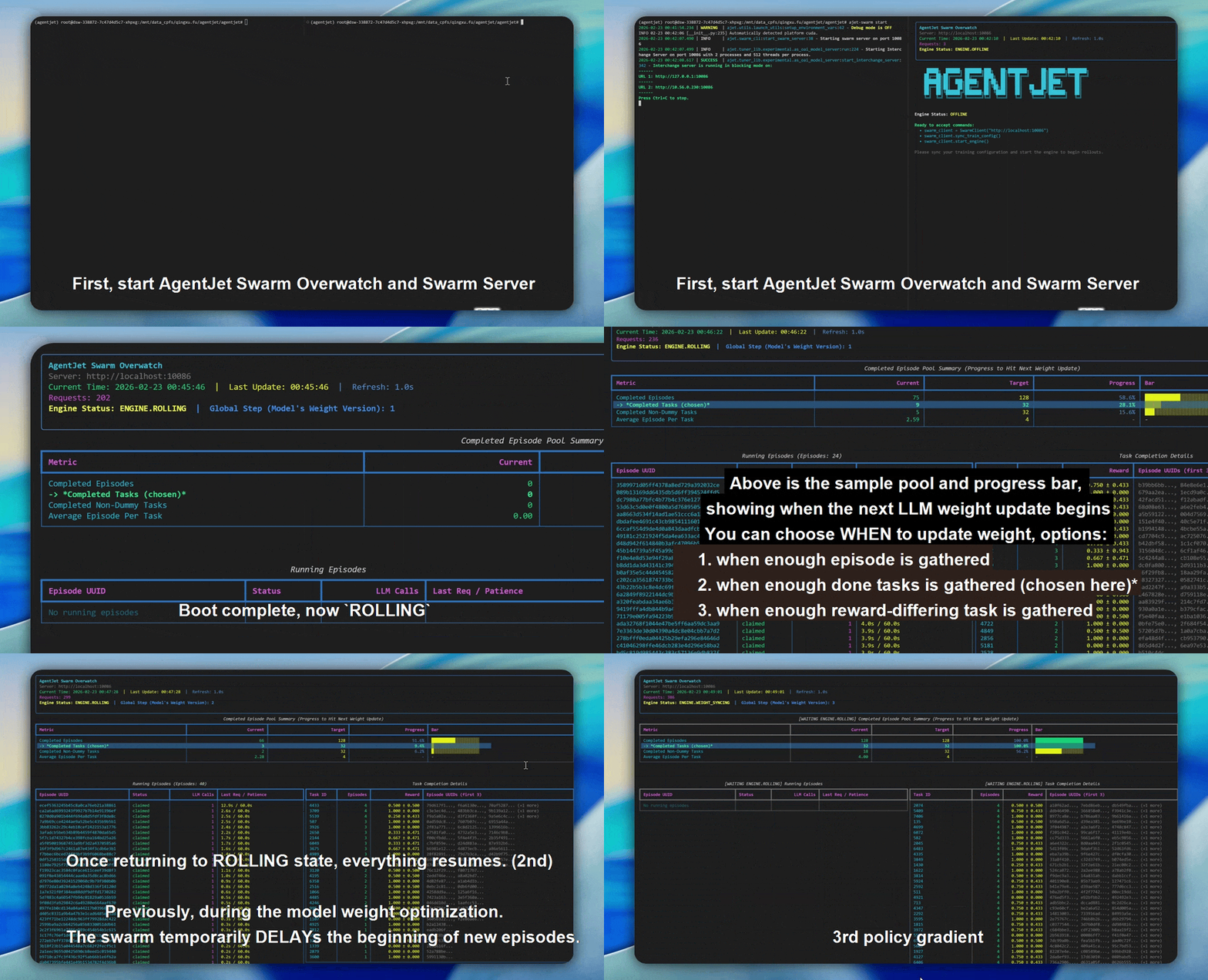
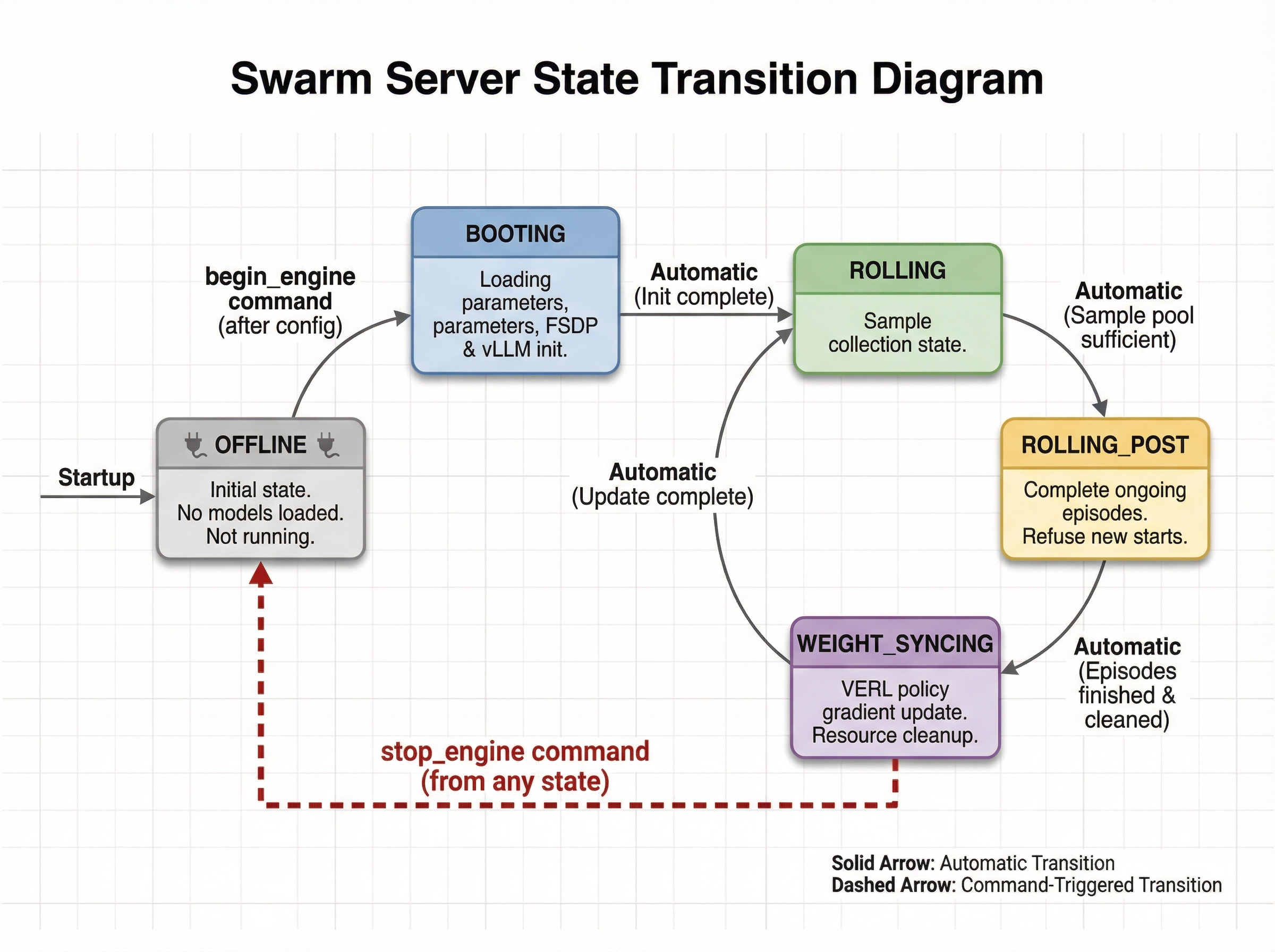
This gif displays the life cycle of a Swarm Server. The possible states and transitions of the swarm server are as follows:
- OFFLINE: The swarm server starts but has not loaded any models and is not running any training. The swarm server enters this state directly after startup. Additionally, it enters this state after receiving a
stop_enginecommand from any client while in any other state. - BOOTING: The swarm server enters this state after receiving configuration and then an explicit
begin_enginecommand, performing model parameter loading, FSDP initialization, and vLLM initialization. - ROLLING: The swarm server sample collection state. It automatically enters this state when BOOTING ends or when the WEIGHT_SYNCING state ends.
- ROLLING_POST: The swarm server automatically enters this state when it determines the sample pool is sufficient for the next policy gradient step. In this state, it can still normally complete episodes that are halfway through, but refuses to accept new episode starts.
- WEIGHT_SYNCING: The swarm server enters this state after being in ROLLING_POST and having reclaimed and cleaned up all computational and thread resources from ongoing episodes. During this phase, VERL will complete the current policy gradient strategy update, then return to ROLLING, cycling repeatedly.
Sample Collection Method
The swarm_mode_sample_collection_method config option determines when the swarm server considers the current batch of samples "sufficient" and initiates the transition toward a weight update. There are three methods to choose from.
rollout_until_finish_enough_episodes is the simplest: the server keeps collecting until the total number of completed episodes reaches n_batch_task × rollout_n. It does not care which task each episode came from, so fast tasks may be over-represented. This can be acceptable for homogeneous task sets, but is generally not recommended when tasks vary significantly in difficulty or duration.
rollout_until_finish_enough_tasks (the default) is more structured. A task is only considered "done" once it has accumulated at least rollout_n completed episodes. The server waits until n_batch_task such tasks are ready. This guarantees every task in the training batch carries a full group of rollouts, which is a prerequisite for group-relative advantage estimation (e.g., GRPO). There is also a safety valve: if the total cached episodes grows too large before the stop condition is met, the cache is forcefully cleared to prevent memory exhaustion.
rollout_until_finish_enough_non_dummy_tasks goes one step further by also filtering out tasks where all rollouts received identical rewards. Such tasks carry no learning signal — a task that always scores 1.0 or always scores 0.0 on a given task contributes nothing to advantage estimation. This method is most useful when your task distribution includes many very easy or very hard instances.
Transition: once the stop condition is met, the server does not stop abruptly. It first enters ROLLING_POST, flagging worker threads to reject new episode requests while still allowing in-flight episodes to finish naturally. When the last episode drains, the server moves into WEIGHT_SYNCING, hands the collected batch to VERL for a policy gradient update, and then automatically returns to ROLLING to begin the next collection cycle.
Swarm Client
The Swarm Client is the process-side counterpart to the Swarm Server. It runs on your training machines — or even on a GPU-less laptop — and is responsible for claiming episodes, executing agent rollouts, and reporting results back. Multiple clients can connect to the same server simultaneously, forming the distributed "swarm".
Training Configuration Syncing
Swarm server starts in ENGINE.OFFLINE. In this state it is alive, but has no training process and no model weights loaded. Before any rollout can happen, one client must send the full training configuration to the server.
Conceptually, syncing config is a two-step handshake:
1) Sync YAML (sync_train_config)
- Client serializes your AgentJetJob into a YAML string and posts it to POST /sync_train_config.
- Server stores this YAML in shared memory.
- This call is only allowed when the server is ENGINE.OFFLINE. If you need to change config mid-run, you must stop_engine() first.
2) Boot engine (start_engine)
- Client triggers POST /start_engine.
- Server writes the synced YAML into a temporary file, prepares the experiment config, and spawns the training process.
- When booting completes, server transitions to ENGINE.ROLLING and starts registering/serving episodes.
In code, the most common pattern is:
from ajet.copilot.job import AgentJetJob
from ajet.tuner_lib.experimental.swarm_client import SwarmClient

swarm_client = SwarmClient("http://your-swarm-server:10086")
yaml_job = AgentJetJob(
    algorithm="grpo",
    project_name="ajet-swarm",
    experiment_name="exp",
    n_gpu=8,
    model="/path/to/model",
    batch_size=32,
    num_repeat=4,
)

# Option A: explicit two-step handshake
swarm_client.sync_train_config(yaml_job)
swarm_client.start_engine()

# Option B: one-shot helper (recommended)
# swarm_client.auto_sync_train_config_and_start_engine(yaml_job)
Practical tips:
- Treat YAML as the source of truth: you can inspect it with
yaml_job.dump_job_as_yaml("./config.yaml")and load overrides viayaml_job.build_job_from_yaml("./config.yaml"). - Idempotency:
auto_sync_train_config_and_start_engine()is designed to be safe if the engine is already ROLLING (it will do nothing) and will wait if the engine is BOOTING / WEIGHT_SYNCING. - Monitoring: run
ajet-swarm overwatch --swarm-url=http://your-swarm-server:10086(orpython -m ajet.launcher --swarm-overwatch=...) to watch the server states and rollout pool.
Episode Running
An “episode” is the atomic unit of rollout work exchanged between client and server. The client does not “create” episodes; it claims episodes that the server has already registered (internally created by the training engine / runners).
At a high level, one episode looks like:
1) Claim an episode (begin_episode)
- Client calls begin_episode(...), which blocks/retries until server is in ENGINE.ROLLING and there is an available episode.
- On success, you receive:
- episode_uuid: the episode identifier
- OpenaiBaseUrlAndApiKey(base_url, api_key, episode_uuid): credentials for OpenAI-compatible requests
2) Run your agent (your code)
- Use base_url + api_key for all LLM calls during this episode.
- This matters: the server uses these credentials to route your requests to the correct runtime/model and to attribute the requests to the claimed episode_uuid.
3) Finish the episode (end_episode) or discard it (abort_episode)
- end_episode(task, episode_uuid, workflow_output) sends reward + metadata back to the server.
- abort_episode(episode_uuid) tells the server to drop this episode result and clean up.
Minimal safe skeleton (always abort on exceptions):
from ajet.schema.task import WorkflowOutput, Task

def rollout(task: Task) -> float | None:
    episode_uuid, api = swarm_client.begin_episode(
        discard_episode_timeout=600,
        episode_type="train",
    )
    try:
        workflow_output: WorkflowOutput = execute_agent(task, api)
        swarm_client.end_episode(task, episode_uuid, workflow_output)
        return workflow_output.reward
    except Exception:
        swarm_client.abort_episode(episode_uuid)
        raise
Abort semantics (why it is safe for debugging):
- When the server is ENGINE.ROLLING,
abort_episodetypically reverts the episode back to the unclaimed pool, so other clients can pick it up. - When the server is in ENGINE.ROLLING_POST,
abort_episodewill delete the episode record instead of re-queueing it, so weight syncing won’t be blocked by zombie episodes.
Timeouts you should understand:
discard_episode_timeout(server-side): if an episode is idle (no LLM requests) for too long, the server can discard it.- Client-side protection: the client records an internal max lifetime (currently
max_episode_time = 2 × discard_episode_timeout). If you submit too late,end_episodewill be converted into anabort_episodeto avoid poisoning the pool.
For very long or complex agents, consider periodically checking:
if not swarm_client.can_continue_episode(episode_uuid):
    # The server no longer considers this episode valid.
    swarm_client.abort_episode(episode_uuid)
    return None
Regular Training
Regular training is the default “1 server, 1 (or many) clients” loop. The server continuously cycles through: ROLLING → ROLLING_POST → WEIGHT_SYNCING → ROLLING, while clients keep claiming episodes and reporting rewards.
The canonical runnable example lives in docs/en/swarm_best_practice.md (Demo 1). The deep-dive view is:
1) Start the server (and monitor it)
2) On any client machine, sync config and boot the engine
swarm_client = SwarmClient("http://localhost:10086")
swarm_client.auto_sync_train_config_and_start_engine(yaml_job)
3) Define rollout logic (episode lifecycle + reward)
- Claim an episode via begin_episode().
- Run agent calls using the returned base_url/api_key.
- Produce WorkflowOutput(reward=..., metadata=...).
- Report it via end_episode(...).
4) Drive training by repeatedly running batches of episodes
The usual batching relationship is:
- remote
batch_sizeis the number of tasks in one policy-gradient batch (server side) - local
num_repeat(a.k.a. rollout.n / GRPO N) is the number of rollouts per task - so one “full” batch roughly needs
batch_size × num_repeatcompleted episodes.
The helper run_episodes_until_all_complete(tasks, func=rollout, auto_retry=True) is just a convenience thread pool; you can implement your own scheduling.
Operational notes:
- Use
ajet-swarm overwatch --swarm-url=...to watch running episodes and whether the pool is close to triggering WEIGHT_SYNCING. - If you need to change training YAML, call
swarm_client.stop_engine()first (server returns to ENGINE.OFFLINE), then sync again.
Training Multi-Model Multi-Agent RL Task
This is where Swarm becomes more than “distributed rollouts”.
In multi-model multi-agent RL, a single environment task requires multiple models to cooperate (e.g., a planner model + a specialist model, or a small model for drafting and a large model for verification). In AgentJet Swarm, the clean way to do this is:
- One Swarm Server per trainable model (each server has its own optimizer, weights, and rollout pool)
- One client workflow orchestrates them (one “logical” rollout claims one episode from each server)
- Each server receives its own reward signal via its own
end_episode(...)
See docs/en/swarm_best_practice.md (Demo 2) for a complete example. The essence is:
1) Deploy two servers (possibly on different GPU machines)
ajet-swarm start --swarm-port=10086  # server A (e.g. 7B)
ajet-swarm start --swarm-port=10086  # server B (e.g. 14B)
2) Create two SwarmClients, sync two configs
swarm_7b = SwarmClient(REMOTE_7B_SWARM_URL)
swarm_14b = SwarmClient(REMOTE_14B_SWARM_URL)

swarm_7b.auto_sync_train_config_and_start_engine(job_7b)
swarm_14b.auto_sync_train_config_and_start_engine(job_14b)
3) In one rollout, claim two episodes and end two episodes
def rollout(task: Task):
    ep7, api7 = swarm_7b.begin_episode(discard_episode_timeout=240)
    ep14, api14 = swarm_14b.begin_episode(discard_episode_timeout=240)
    try:
        out7, out14 = execute_agent(task, api7, api14)  # two WorkflowOutputs
        swarm_7b.end_episode(task, ep7, out7)
        swarm_14b.end_episode(task, ep14, out14)
        return (out7.reward + out14.reward) / 2.0
    except Exception:
        swarm_7b.abort_episode(ep7)
        swarm_14b.abort_episode(ep14)
        raise
Key design constraint:
- A “logical” rollout is only valid if you commit/abort all involved episodes together. If one model’s episode is ended but the other is aborted (or hangs), you create asynchronous noise across models.
Batching rule of thumb:
- Keep
num_repeataligned across servers. - It’s simplest when both servers use the same
batch_sizeand you drive the outer loop by one of them (as in the best-practice example).
Using Swarm Client to Debug During Training
Swarm is explicitly designed for many clients connecting to the same server at the same time. This enables a very practical workflow:
- Client A: long-running training rollout worker(s)
- Client B: attach later as a “debug client” to reproduce failures, inspect behaviors, and validate fixes
The one rule for the debug client is exactly what you noted: do not contribute data to the training batch.
The simplest discipline is:
- Debug client still calls
begin_episode()to obtain valid routing credentials. - Debug client runs the agent.
- Debug client always ends with
abort_episode(episode_uuid)(neverend_episode).
swarm_debug = SwarmClient("http://your-swarm-server:10086")

def debug_once(task: Task):
    episode_uuid, api = swarm_debug.begin_episode(discard_episode_timeout=120)
    try:
        _ = execute_agent(task, api)
    finally:
        # Always abort so this episode does not enter the training pool
        swarm_debug.abort_episode(episode_uuid)
Why this works:
abort_episodereturns the claimed episode to the pool (or deletes it in ROLLING_POST), so your debugging does not change the reward statistics used for the next weight update.
Practical cautions:
- Keep debug parallelism low. If the debug client claims too many episodes and holds them, training clients may temporarily see “No available episodes to claim”.
- Prefer short
discard_episode_timeoutfor debugging so stuck runs get cleaned up fast. - Keep
ajet-swarm overwatchopen to ensure debug episodes are quickly aborted and not piling up.