OpenClaw Skill
Use Sirchmunk as an OpenClaw skill so that any OpenClaw-compatible AI agent can search your local files with natural language — no embedding database, no indexing, no ETL.
Published on ClawHub: https://clawhub.ai/wangxingjun778/sirchmunk
Quick Start
1. Install Sirchmunk
pip install sirchmunk
sirchmunk init          # creates ~/.sirchmunk/.env
Edit ~/.sirchmunk/.env — at minimum set:
LLM_API_KEY=sk-...
LLM_BASE_URL=https://api.openai.com/v1   # or any OpenAI-compatible endpoint
LLM_MODEL_NAME=gpt-4o

# Optional: default search directories (comma-separated)
SIRCHMUNK_SEARCH_PATHS=/path/to/your/docs,/another/path
2. Start the Sirchmunk API server
sirchmunk serve # default: http://0.0.0.0:8584
Verify it is running:
curl http://localhost:8584/api/v1/search/status
3. Install the skill in OpenClaw
Install the skill from ClawHub:
npx clawhub@latest install sirchmunk
Or copy the sirchmunk/ directory from the openclaw_skills recipe into ~/.openclaw/skills/sirchmunk/.
4. Use it
The agent can now invoke the sirchmunk_search tool. You can also call the script directly:
# Use default SIRCHMUNK_SEARCH_PATHS from the server environment
~/.openclaw/skills/sirchmunk/scripts/sirchmunk_search.sh "What is the reward function?"

# Override with an explicit path
~/.openclaw/skills/sirchmunk/scripts/sirchmunk_search.sh "auth flow" "/path/to/project"
Usage Examples
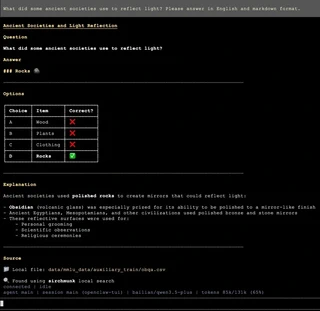
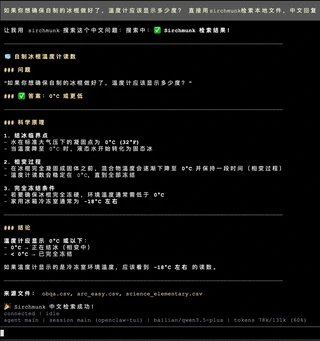
Below are screenshots of local RAG-style retrieval with the Sirchmunk skill inside OpenClaw TUI (openclaw-tui): the agent calls sirchmunk to read matching rows from local files (e.g. OBQA / science QA data), then summarizes in the requested language.
English — local search example
Query (illustrative): ask about ancient societies and light reflection; the answer is grounded in a local file such as obqa.csv, attributed as “Found using sirchmunk local search”.
Chinese — local search example
Query (illustrative): about what temperature a thermometer should show when homemade popsicles are ready; the agent uses sirchmunk to retrieve from local CSVs (obqa.csv, arc_easy.csv, etc.) and responds in structured Chinese.
How It Works
The skill is a thin HTTP client. When invoked it sends a POST request to the local Sirchmunk server:
curl -s -X POST "http://localhost:8584/api/v1/search" \
  -H "Content-Type: application/json" \
  -d '{
    "query": "your question",
    "mode": "FAST"
  }'
pathsis optional. If omitted, the server usesSIRCHMUNK_SEARCH_PATHSfrom its environment, then falls back to its working directory.modecan beFAST(default, 2-5 s),DEEP(comprehensive, 10-30 s), orFILENAME_ONLY(no LLM).
See the API Reference for the full parameter reference, SSE streaming endpoint, and client examples in Python / JavaScript.
Skill Manifest
The SKILL.md inside the sirchmunk/ directory tells the OpenClaw runtime what tools the skill exposes:
---
name: sirchmunk
description: Local file search using sirchmunk API. Use when you need to search for files or content by asking natural language questions.
---
The wrapper script sirchmunk_search.sh accepts a query and an optional paths argument, forwards them to the Sirchmunk server, and returns the JSON result.
File Structure
recipes/openclaw_skills/
├── README.md
├── assets/
│   ├── example1.png                # Chinese usage screenshot
│   └── example2.png                # English usage screenshot
└── sirchmunk/
    ├── SKILL.md                    # OpenClaw skill manifest
    └── scripts/
        └── sirchmunk_search.sh     # Wrapper script invoked by the agent
Security Notes
- The Sirchmunk server runs locally and binds to
localhostby default. File contents are sent to the configured LLM endpoint for analysis. If you use a cloud LLM, be aware that searched content leaves the machine. - Prefer a local LLM (Ollama, vLLM, etc.) or restrict
SIRCHMUNK_SEARCH_PATHSto non-sensitive directories if data exfiltration is a concern. - Do not expose port 8584 to untrusted networks without additional authentication.